What is it
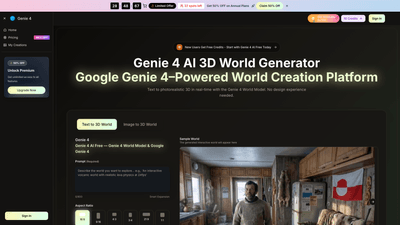
Genie 4 AI is a Google Genie 4-powered 3D world creation platform that turns text prompts into immersive, explorable 3D environments directly in your browser. Leveraging the Genie 4 World Model, it delivers real-time, photorealistic world generation at 720p and 24 frames per second, with no installation required. The tool is designed for researchers, educators, and creators who want to design, test, and share interactive worlds quickly — from classroom simulations and scientific visualizations to creative storytelling and game-ready scenes. Worlds are consistent for minutes, meaning you can revisit locations without losing coherence, and you can export playable builds or capture sequences for demonstrations, teaching, or integration with other engines and pipelines. It supports text-to-3D and image-to-3D workflows, as well as on-the-fly scene adjustments via promptable events. Private by design and built with safety and responsible innovation in mind, Genie 4 AI is suitable for both research and commercial projects under its current licensing terms.
Features
- Real-time, browser-based 3D world generation (no install required)
- Text-to-3D and image-to-3D: describe scenes in plain language and generate explorable worlds
- 24 FPS, 720p output for smooth interaction in the browser
- Consistency for minutes: scene layout and narrative stay coherent as you move and re-enter spaces
- Promptable events: alter weather, lighting, and objects with simple text prompts
- Physics and environments built with DataGravity-inspired realism (believable materials and fluids)
- Multiple use cases: research and simulation, education and immersive learning, creative world-building, and scientific visualization
- Private, secure sessions with transparent safety and governance
- Export options: playable builds or sequences for game engines, streaming, or lab pipelines
- Commercial licensing options and no watermarks on applicable plans
- Flexible pricing with free credits and tiered plans (Basic, Professional, Enterprise) and annual discounts
How to Use
- Access Genie 4 AI in your web browser (no download needed)
- Step 1: Describe Your World — write a short prompt detailing the setting, mood, and what should happen
- Step 2: Generate the World — hit Generate to produce a playable 3D scene at 720p/24 FPS
- Step 3: Explore and Interact — walk through the world in real time; use text prompts to change weather, add objects, or tweak lighting
- Step 4: Export or Continue — export a playable build or continue iterating with new prompts
- Start with a Free tier: New users receive free credits to try Genie 4 AI Free today
- Pricing and credits: See the pricing section for details on credits, monthly limits, and licensing
Practical workflows include training agents in varied environments, creating explorable educational worlds for history, geography, and science, or rapidly prototyping creative scenes for storytelling and games. The browser-based approach enables easy sharing with teammates, students, or stakeholders, while the option to export sequences supports integration with broader pipelines.
Pricing
- Free Trial / Free Credits: New users start with free credits to try Genie 4 AI Free
- Basic (for hobbyists and beginners): $29.9/month (discounted to $17.9/month during flash promotions)
- Includes: 12,000 credits per year, up to 100 videos per month, commercial license, no watermark, priority support
- Yearly pricing available with Save 40% offer
- Professional (for creators and professionals): $49.9/month (discounted to $29.9/month during flash promotions)
- Includes: 24,000 credits per year, up to 200 videos per month, commercial license, no watermark, priority support
- Enterprise (for teams and businesses): $99.9/month (discounted to $59.9/month during flash promotions)
- Includes: 72,000 credits per year, up to 600 videos per month, commercial license, no watermark, priority support
- Annual discounts: Limited-offer promotions provide up to 40% savings when billed annually
- Credits and usage: Credits are consumed as you generate or export content, with clear per-100-credit pricing on the plan page
- Cancel anytime: Flexible billing with options to cancel or adjust plans
Tips
- Start simple: Begin with a concise scene description and refine iteratively to improve realism and coherence.
- Be specific with prompts: Include desired mood, lighting, weather, objects, and spatial relationships to guide the World Model.
- Use on-the-fly edits: Leverage promptable events to test how weather, lighting, or object placements affect storytelling or simulation outcomes.
- Manage performance: For smoother browser performance, use 720p output and keep the scene complexity in check; switch to lower workloads for mobile devices if needed.
- Plan for learning and research: Use the consistent environment feature to run multiple trials in the same location without re-authoring the scene.
- Export strategically: Use exports for demonstrations, training demos, or integration with game engines and lab pipelines; capitalize on the commercial license to reuse assets in approved contexts.
- Privacy and safety: Rely on the built-in privacy features and review licensing terms when using the outputs in commercial or public-facing projects.
Frequently Asked Questions
- What is Genie 4? Genie 4 is a tool that turns a short text prompt into an interactive 3D world you can explore in real time within your browser, powered by the Genie 4 World Model and Google Genie 4.
- How do I create my first world? Describe your scene in a few sentences, click Generate, and you’ll receive a playable 3D world at 720p/24 FPS that you can walk through and tweak.
- What resolution and frame rate do I get? Output is 720p at approximately 24 FPS, optimized for smooth browser-based exploration.
- Can I use it for research or commercial projects? Yes. Genie 4 AI supports research, education, and creative work; check current licensing terms for production use in commercial projects.
- Does it work on phones and tablets? Yes, it runs in modern browsers on desktop and mobile devices; performance may vary by device.
- Is there a watermark or limitation on outputs? Plans with commercial licenses offer watermark-free outputs; some tiers may include watermarks on non-commercial uses or free trials.
- Can I export or integrate with other tools? You can export playable builds or sequences for game engines, streaming, or lab pipelines, enabling broader workflows.
Ready to start? Genie 4 AI provides a powerful, accessible path to exploring and sharing explorable 3D worlds from text prompts, with scalable plans to fit researchers, educators, and creators alike.