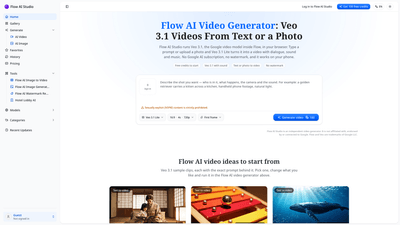
What is it
Flow AI Studio is an independent, browser-based video generator that delivers Veo 3.1-powered filmmaking in a streamlined, per-clip workflow. Built around Veo 3.1, Google DeepMind’s video model, Flow AI Studio lets you turn prompts or photos into short, publish-ready videos with dialogue, sound effects, and music — all without a Google subscription and without watermarks. The tool is designed for quick creativity: describe a scene, choose a format, and generate a clip that can be downloaded as an MP4 and used commercially. It’s accessible on any device with a modern browser, including phones, tablets, laptops, and Chromebooks.
Flow AI Studio emphasizes simplicity and transparency. Each generation shows the credit cost before you generate, and failed clips are refunded automatically. New users start with free credits (100 credits on signup) to test Veo 3.1 Lite, with additional credits available via paid plans. Veo 3.1 Lite produces 4–8 second clips with native audio, while Veo 3.1 Fast delivers higher detail and 1080p output. Clips can be combined afterward to create longer videos, but the platform focuses on turning a prompt or a photo into a ready-to-download video without a watermark.
Features
- Veo 3.1 video engine in two tiers: Lite (4–8 seconds, 720p) and Fast (more detail, up to 1080p)
- Text-to-video and photo-to-video capabilities
- Audio included in all clips: dialogue, ambience, effects, and music synchronized to on-screen action
- No watermark on exports, across all plans and free credits
- Browser-based: works on Android, iPhone, Windows, Mac, and Chromebooks (no app installation required)
- 9:16 (Vertical) and 16:9 (Wide) aspect ratios for Shorts, Reels, and YouTube formats
- Per-clip pricing: see the exact credit cost before you generate; failed clips are refunded
- Commercial use allowed on all plans
- Sample prompts and reference clips to inspire new ideas
- Image-to-video workflow: start from a photo and animate it with movement and dialogue
- Independent from Google Flow: Flow AI Studio is not affiliated with Google, but uses the Veo 3.1 model
How to Use
- Write a prompt or upload a photo
- Describe the scene, actions, and camera, and include dialogue in quotes with speaker labels.
- To animate a still image, upload it as the first frame; you can add a second image as the last frame for a complete sequence.
- Pick the model, format, and length
- Choose Veo 3.1 Lite for the lowest price or Veo 3.1 Fast for finer detail.
- Select aspect ratio: 16:9 for YouTube, 9:16 for Shorts/Reels.
- Pick clip length: 4, 6, or 8 seconds per take.
- Generate and download
- Click Generate video; most videos finish in a minute or two.
- Download as an MP4 with sound and no watermark; the price is shown before you press Generate.
- If a clip fails, it’s refunded automatically, and you can try another variation.
- Edit and assemble
- Flow AI Studio focuses on producing individual clips from prompts or photos. For longer videos, join multiple clips in your preferred editor.
- You can repeat the process with the same characters or prompts to build scenes or longer narratives.
Pricing and access note
- Free credits to start: Flow AI Studio offers 100 free credits when you sign up.
- Per-clip pricing: 8 seconds of Veo 3.1 Lite is 200 credits; 8 seconds of Veo 3.1 Fast is 600 credits.
- Plans and credits: Plans start at $39/month for 5,000 credits; one-time packs like $49 for 4,000 credits (never expire).
- No watermark across all plans; commercial use is allowed.
Pricing
- Free tier: 100 credits on signup (no card required) to create a 4-second Veo 3.1 Lite clip.
- Credit costs: the exact cost for each clip is displayed before you generate; failed clips are refunded.
- Per-clip examples: 8 seconds in Veo 3.1 Lite typically costs around 200 credits, while 8 seconds in Veo 3.1 Fast can be around 600 credits.
- Paid plans:
- Starting at $39/month for 5,000 credits
- One-time pack: $49 for 4,000 credits (credits do not expire)
- All plans include commercial-use rights and watermark-free exports.
- The platform operates on a credit-based model, with no Google Flow subscription required for Flow AI Studio users.
Tips
- Craft concise, descriptive prompts and clearly indicate who speaks each line when including dialogue.
- Use quotes to assign dialogue to specific characters or hosts to create engaging talking-head or narrative clips.
- Start with a simple concept (e.g., a product reveal, a storytelling moment) and add movement by describing camera motion or transitions in the prompt.
- For Shorts and Reels, prefer 9:16 format and keep clips to 4–8 seconds to maintain impact and coherence when stitched together.
- When animating photos, use a consistent reference frame (first and last frame) to maintain visual continuity across clips.
- Plan a sequence: create several 4–8 second clips with the same characters or theme and assemble them in post-production to form a longer narrative.
- Always preview the generated clip with the credit cost in mind; if the result isn’t satisfactory, adjust the prompt and try again rather than expanding the clip length.
- Leverage the sample Veo 3.1 prompts as starting points; customize the prompts to fit your brand voice, tone, and messaging.
- Use the tool on any compatible device; no app installation required, making it convenient for quick idea validation or client previews.
- Consider using Flow AI Studio for commercial work, including ads, product demos, and narrated tutorials, given the watermark-free export and straightforward licensing.
Frequently Asked Questions
-
What is Flow AI Studio? Flow AI Studio is an independent Flow AI video generator that uses Veo 3.1 to turn prompts or photos into short, shareable videos with sound. It operates in a browser and does not require a Google subscription or an app installation.
-
Is Flow AI Studio the same as Google Flow? No. Flow AI Studio is independent of Google. It runs Veo 3.1 via an API in a standalone environment, offering per-clip pricing, no watermark, and a streamlined workflow without the need for Google subscriptions.
-
What models does it use? It uses Google’s Veo 3.1 in two tiers: Veo 3.1 Lite (720p) and Veo 3.1 Fast (1080p). The platform may also expose related tiers like Seedance 2.5 and H3 Max in the menu.
-
How much does it cost to generate videos? Costs are shown before you generate. For example, 8 seconds of Veo 3.1 Lite is about 200 credits, and 8 seconds of Veo 3.1 Fast is about 600 credits. New users receive 100 free credits to begin with.
-
Do exported videos have a watermark? No. Flow AI Studio exports are watermark-free on every plan and with free credits.
-
Can I use the videos commercially? Yes. Commercial use rights are included with all plans and free credits, suitable for client work, ads, and monetized channels.
-
Does it work on mobile or tablets? Yes. It runs in any modern browser on Android, iPhone, Windows, Mac, or Chromebook—no app installation required.
-
How long can a single Flow AI video take? Each Veo 3.1 clip is 4–8 seconds. You can chain multiple clips to create longer videos.
-
Is there a free tier, and what does it include? Flow AI Studio offers 100 free credits upon signup to create a 4-second Veo 3.1 Lite clip. Additional usage requires credits purchase or a paid plan.
-
Can I turn a photo into a video? Yes. Upload a photo to use it as the first frame, then describe the motion or action to animate it. You can add a second image as the last frame for a complete sequence.
-
How do I maximize quality and consistency? Maintain a consistent character voice and visual cues across clips. Use the same framing, lighting cues, and dialogue style to ensure continuity when you assemble multiple clips into a longer video.
This comprehensive overview highlights Flow AI Studio’s core value: a flexible, cost-transparent, watermark-free, browser-based tool for rapid AI-generated video content using Veo 3.1. Ideal for creators, marketers, advertisers, and anyone needing quick, publish-ready clips without traditional production overhead.