What is it
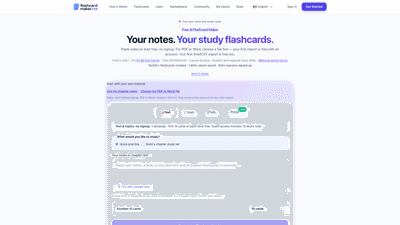
AI Flashcard Maker is a free-to-start, AI-powered tool that transforms your notes, topics, or documents into ready-to-study flashcards in seconds. Designed for students who value time, it lets you paste notes or type a topic to generate clear question-and-answer pairs, with support for multiple languages. You can import PDFs or Word documents (first import free when you create an account) and export your decks to Anki, CSV, or Quizlet. The platform combines AI-generated content with built-in spaced repetition and multiple study modes to optimize retention while reducing the manual workload of creating cards. It also offers ready-made, curated decks and the option to study with AI-driven explanations through a Pro plan.
Key keywords: AI flashcard maker, AI-generated flashcards, spaced repetition, PDF import, Word import, Anki export, CSV export, multi-language support, AI study assistant, ready-made decks.
Features
- AI-generated flashcards from notes or topics
- Paste text or enter a topic and generate Q–A pairs in seconds
- Supports content in any language
- PDF/Word imports available (first import free with an account)
- Study modes and retention tools
- Quiz mode, classic flashcard mode, and audio learning
- Built-in spaced repetition to optimize long-term retention
- AI-assisted grading to evaluate your answers
- Decks and content management
- Create and manage decks; Pro users can go unlimited
- Up to 100 cards per deck in Pro
- 35+ ready-made decks across 8 subjects (Programming, Languages, Science, Math, Professional topics, Test Prep, History, etc.)
- Clone and share decks with classmates or study groups
- Import/export and interoperability
- Export to Anki, CSV, or Quizlet (first export free)
- PDF import support (text-based PDFs; OCR for image-based PDFs)
- URL content import to generate decks from web content
- AI study assistant (Pro)
- AI chat for explanations and quiz help
- Extract knowledge from PDFs/Word docs
- Accessibility and collaboration
- Works across devices with sign-in; guest access available for limited decks
- Source excerpts included in imports to verify content
How to Use
- Start with your material
- Paste notes or enter a topic to generate a deck without requiring an account for text inputs.
- For PDF or Word documents, first choose the file, then create a free account to import (first import is free).
- Generate and review
- Click Generate to create AI flashcards in under five seconds.
- Review, edit questions and answers, and ensure source excerpts are visible for verification.
- Study and track progress
- Practice with quizzes, flip through cards in Flashcard mode, or listen in Audio Learning.
- Rely on spaced repetition to revisit challenging cards more often and easier ones less often.
- Track your mastery and return to decks as needed.
- Enhance and share
- Use ready-made decks to jump-start studying or clone decks for collaboration.
- Import additional PDFs or Word documents later (first import free; subsequent imports may require credits or Pro).
- Export or sync
- Export your decks to Anki, CSV, or Quizlet (first export free) for broader study workflows.
- Sign up to enable cloud syncing across devices and sharing capabilities.
Pricing is designed to accommodate both casual learners and power users. See the Pricing section for details, including free access, Pro features, and one-time passes.
Pricing
- Free to start
- Text-based input: paste notes or type a topic without signing up
- 1 deck per day for AI generation; guest access includes up to 10 decks total
- First 10 cards of each deck free (for sign-up users)
- First document import (PDF/Word) is free with an account
- Pro
- Starting at $1.99 for the first month, then $9.99 per month
- Unlimited decks
- Up to 100 cards per deck
- AI chat and AI study assistant
- PDF/Word import
- Cancel anytime
- One-time passes (optional)
- 7-Day Pass: typically a one-time, short-term access option
- Exam Pass: a one-time, longer-term access option
- Listed one-time prices include $4.99 for 7-Day Pass and $19.99 for Exam Pass (always check current terms)
- Additional notes
- Student and regional plans may differ
- All pricing terms are subject to change; billing and refunds follow the provider’s terms
Tips
- Start with short notes or a focused topic to generate a compact, high-utility deck quickly.
- Use the AI tutor for explanations of difficult concepts or for quiz-style clarification.
- Leverage multi-language support to build vocabulary in foreign languages or study terms in specialized fields.
- Combine PDF/Word imports with in-app editing to tailor cards to your course syllabus.
- Browse ready-made decks to save time; clone and customize them to fit your needs.
- Use spaced repetition consistently to maximize long-term retention and minimize study time.
- Share decks with classmates for collaborative studying and faster review cycles.
- When exporting to Anki or CSV, organize decks by subject or exam to streamline exam prep.
Frequently Asked Questions
- What is the best free flashcard maker?
- The AI Flashcard Maker offers AI-generated flashcards from pasted notes or topics with no signup or credit card required for text inputs. PDF or Word imports require a free account, and the first import is free. Built-in spaced repetition and quiz modes help you review what you learn.
- How do I create flashcards with AI?
- Paste your notes or type a topic, click Generate, and the AI analyzes your content to create clear Q–A pairs in seconds. You can also upload a PDF or import content from a URL to auto-generate a complete study deck.
- Do I need to sign up to use this flashcard maker?
- You can create flashcards from text or a topic without an account. PDF and Word imports require a free account, and your first import is free. Signing up unlocks 3 free decks, cloud sync, and sharing capabilities.
- Can I make flashcards from a PDF?
- Yes. Choose a text-based PDF or Word file first, then create a free account to import it. Your first import includes up to 15 cards without payment. Later imports may require PDF credits or Pro. Scanned image PDFs require OCR.
- What is spaced repetition and how does it work?
- Spaced repetition schedules card reviews at increasing intervals based on how well you know each card, maximizing retention with minimal effort. The platform’s algorithm automates this process within study sessions.
- Is this flashcard maker really free?
- The core features are free: AI-generated flashcards, quizzes, spaced repetition, and language support. A Pro plan adds unlimited decks, more imports, and an AI chat assistant.
- How many flashcards can I create?
- Free users can create 1 deck per day with up to 10 cards per deck (guests get up to 10 decks total). Signed-in free users get 3 free decks with the first 10 cards of each deck free. Pro users can have unlimited decks with up to 100 cards per deck.
- Can I share my flashcards with classmates?
- Yes. You can generate a shareable link for any deck, allowing classmates to clone the deck into their own collection and study with full access to quizzes and spaced repetition.
- Can I export to Anki or CSV?
- Yes. Anki/CSV/Quizlet export is available, with the first export free. Additional exports may be part of Pro or paid options, depending on your plan.
- Who is this tool best for?
- It’s ideal for students who want to save time on flashcard creation, learners preparing for standardized tests (GRE, MCAT, USMLE, nursing exams, etc.), language learners building vocabulary, and professionals who need concise study aids from PDFs, textbooks, or lecture notes.
If you’d like, I can tailor this content further for a specific audience (e.g., nursing students, computer science students, language learners) or adjust the tone to be more formal or more casual.