What is it
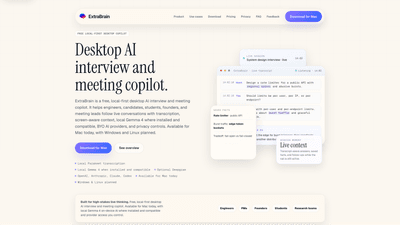
ExtraBrain is a free, local-first desktop AI interview and meeting copilot designed for high-stakes live conversations. Built for Mac today—with Windows and Linux on the roadmap—it captures live audio and transcripts, provides screen-aware context, and turns ongoing discussions into organized prompts, answer structures, and session memory. It supports on-device AI with local Gemma 4 when available, while also offering compatibility with BYO AI providers (OpenAI, Anthropic, Claude, Codex, and other compatible endpoints). The app emphasizes privacy and control: transcripts, prompts, screenshots, notes, and session memory can stay on your device, or you can selectively send content to external providers. ExtraBrain works as a private thinking layer for interviews, meetings, lectures, and research, without turning you into a plug-in for a meeting bot.
Core value: a private, controllable, context-rich workspace that helps you think clearly during fast-moving conversations—without sacrificing privacy or platform compatibility.
Features
- Local Gemma 4 on-device AI where installed and compatible
- Local Parakeet transcription for live, private transcription on macOS
- Optional Deepgram transcription support
- BYO AI providers: OpenAI, Anthropic, Claude, Codex, or compatible endpoints
- Transcript capture, prompts, screenshots, notes, and session memory
- Real-time, transcript-aware prompts for coding interviews, system design, behavioral prompts, and high-stakes discussions
- Structured answer generation, baselines, tradeoffs, and follow-up questions
- Post-session outputs: summaries, decisions, risks, owners, and follow-ups
- Desktop window designed for private, live workflows (not a meeting bot)
- Screen-sharing-friendly, platform-agnostic compatibility (Zoom, Google Meet, Teams, Webex, and more)
- Privacy controls: local-first data, optional cloud/provider data paths, and BYO provider keys
- Works across interview modes: coding, system design, behavioral interviews, product discussions, and research calls
How to Use
- Download and install the Mac app
- Get the latest release, install, and launch ExtraBrain before your interview or meeting
- Confirm microphone, transcription, and provider settings
- Choose your transcription and AI provider setup
- Use local Gemma 4 on-device AI if available and compatible
- Or connect OpenAI, Anthropic, Claude, Codex, or other compatible provider access (BYO keys or subscriptions)
- If privacy is paramount, keep everything local and only route content you explicitly approve
- Start and conduct the session
- Use transcript-aware prompts for live coding, system design, product meetings, lectures, and research calls
- Capture transcripts, prompts, screenshots, constraints, and follow-up questions as the conversation flows
- End with context and actionable outcomes
- Generate post-session summaries, decisions, risks, owners, and follow-ups
- Save transcripts, notes, and saved facts on your Mac, with optional selective cloud transmission
- Rehearse and iterate
- Rehearse interview scenarios or meeting workflows before the real session
- Review session history to improve planning and performance for future discussions
Practical use cases include technical interviews (coding prompts, system design rounds, behavioral questions), high-stakes product meetings, customer discovery calls, lectures, and academic research conversations. The tool creates a private “thinking layer” that helps you stay organized under pressure, while giving you control over where data goes and which AI services you rely on.
Pricing
- Free to start: core desktop app with local-first capabilities
- Pro: from $6.99 per month, $9.99 per month during early-adopter promotions, or $79 per year, and a $149 lifetime option
- Features by tier:
- Free: core desktop app, local Gemma 4 on-device AI where installed and compatible, BYO provider setup
- Pro: advanced workflow tools, enterprise support, and expanded controls
- Lifetime/Yearly options: one-time or annual access with enhanced workflow capabilities
- Enterprise options available via contact: policy, deployment, privacy, and custom workflow support for teams
- Always-free elements emphasize access to local-first functionality while enabling paid upgrades for deeper features
Tips
- Prefer local Gemma 4 on-device AI when hardware supports it to maximize privacy and minimize data sent to the cloud
- Pre-configure your provider keys or subscriptions (OpenAI, Anthropic, Claude, Codex) to streamline setup before critical interviews
- Use transcript-aware prompts to structure answers, identify edge cases, and surface tradeoffs during design and coding discussions
- Take advantage of the post-session summaries to capture decisions, owners, and follow-ups while the context is fresh
- Leverage screenshots and saved notes to augment transcripts for review and knowledge transfer
- Ensure compliance with interview or workplace policies; ExtraBrain is a private workspace and should not misrepresent your abilities
- Maintain platform compatibility by testing with the tools you regularly use (Zoom, Google Meet, Teams, Webex, etc.)
- For sensitive scenarios, stay local and disable cloud transmission; privacy controls are designed to give you visibility and choice
Frequently Asked Questions
- What is ExtraBrain?
- ExtraBrain is a free, local-first desktop AI interview and meeting copilot that provides live transcription, screen-aware context, structured prompts, and session memory. It supports local Gemma 4 on-device AI where installed and compatible, along with BYO provider access to OpenAI, Anthropic, Claude, Codex, and other endpoints. It runs on Mac today, with Windows and Linux planned.
- Is ExtraBrain free?
- Yes, ExtraBrain offers a free starting tier with core features. Pro, yearly, lifetime, and enterprise options are available for extended workflows and collaboration.
- What platforms does ExtraBrain support?
- Currently available for Mac, with Windows and Linux planned. It’s designed to work across major video conferencing and interview platforms without acting as a meeting bot.
- Which AI providers does ExtraBrain support?
- OpenAI, Anthropic, Claude, Codex, and other compatible endpoints, plus local Gemma 4 on-device AI where installed.
- Can I bring my own OpenAI or Anthropic key?
- Yes. ExtraBrain supports BYO provider subscriptions or API keys for OpenAI, Anthropic, Claude, Codex, and compatible services.
- How does transcription work?
- ExtraBrain uses local Parakeet transcription and optional on-device GEMMA 4 transcription (where available) to deliver live transcripts. Cloud transcription is also possible via supported providers if chosen.
- Does ExtraBrain collect user data?
- It can keep data locally on your Mac by design. Data flow to external providers is optional and controlled by your configuration. Privacy depends on your chosen setup, including local vs. cloud transcription and provider integrations.
- Is using ExtraBrain in interviews allowed or considered cheating?
- This depends on company or platform policies. ExtraBrain is meant to support private thinking, preparation, and structured thinking, not to misrepresent your skills. Always follow employer and platform guidelines.
- Can interviewers detect ExtraBrain on Zoom, Google Meet, or Microsoft Teams?
- ExtraBrain operates as a private desktop workspace and does not join meetings as a bot. It is designed to stay hidden from screen sharing and screen recording in major video call environments, while still providing live, transcript-aware support on your device.
- Does ExtraBrain help with LeetCode and coding interviews?
- Yes. It is built to assist during coding interviews with live prompts, edge-case identification, and structured responses, along with follow-ups and tradeoffs to discuss with the interviewer.
- Can ExtraBrain help after a meeting or interview?
- Absolutely. Post-session features generate summaries, decisions, risks, owners, and follow-ups, enabling you to capture insights while the context is fresh.
- Is ExtraBrain more like an interview assistant or a meeting notetaker?
- It combines both roles: it functions as an interview and meeting copilot that supports live thinking, but it is designed as a private workspace rather than a public assistant or automatic note-taker for others.
- Can ExtraBrain run without sending content to the cloud?
- Yes, you can keep transcripts, prompts, notes, and session data local. Cloud transmission is optional and configurable, giving you control over data paths and privacy.
- How is ExtraBrain different from alternatives like InterviewCoder, Cluely, or Final Round AI?
- ExtraBrain emphasizes local-first privacy, on-device AI where possible (Gemma 4), and a user-controlled data path with BYO provider options. It integrates live session memory, structured prompts, and post-session summaries within a desktop-only footprint, avoiding being a meeting bot while remaining highly adaptable across interview and meeting contexts.
This comprehensive overview highlights ExtraBrain’s unique value: a privacy-centric, local-first desktop copilot that enhances your ability to think clearly, structure responses, and capture actionable outcomes during high-stakes interviews and meetings—without surrendering control of your data or workflow.