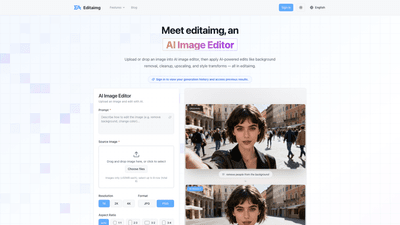
What is it
Editaimg is a powerful AI Image Editor designed to transform photos with a single click. Upload or drag-and-drop your image into the AI-powered editor and instantly apply professional-grade edits such as background removal, image cleanup (inpainting), upscaling, and style transforms. Built for users who want fast, high-quality visuals without needing advanced photo-editing skills, Editaimg also offers non-destructive editing with instant previews and a simple, one-click export workflow.
Key strengths include versatility (from everyday touch-ups to creative transformations), accessibility (no professional skills required), and a robust set of tools that cover common editing needs—background changes, object removal, text adjustments, and more. Users can sign in to view generation history and access previous results, making it easy to iterate on concepts and refine edits over time.
Features
Editaimg consolidates a broad suite of AI-driven capabilities into one online editor. Core features include:
- AI-powered edits: Background removal, cleanup/inpainting, upscaling, and promptable style transforms.
- Object and scene manipulation: Replace objects seamlessly, remove unwanted people or distractions, and place products in realistic settings (e.g., turning a simple product shot into a professional scene).
- Advanced utilities: Add someone to a photo with natural blending, AI Kiss Generator (romantic or cinematic styles), AI Snow for seasonal atmospheres, and AI Image Translator to translate text within images across 130+ languages.
- Text and design tools: Image Text Editor to add or edit text with font/color/texture matching; handwriting and typographic consistency across the image.
- Watermark and branding: Gemini Watermark Remover to export clean, privacy-first images.
- Realistic edits and quick previews: Non-destructive editing, instant previews in a clean grid, and fast one-click export.
- Non-technical workflow: No pro skills required, yet plenty of control via prompts and settings.
- Supported formats and sizes: Upload images in JPG or PNG (images ≤ 50 MB each), with multi-image support up to 8 files per session; flexible aspect ratios (1:1, 2:3, 3:4, 4:5, 16:9, and more) to fit your use case.
In practice, Editaimg helps you create realistic product photos, spotless travel images, polished marketing visuals, and creative edits—everything from subtle retouching to bold transformations.
How to Use
Getting started with Editaimg is straightforward. Here’s a practical, four-step workflow:
- Import your image
- Drag and drop your file into Editaimg (JPG or PNG, up to 50 MB per image).
- You can upload up to 8 images in one session to compare edits side by side.
- Describe your idea
- Use the prompt box to tell the AI what you want, such as “remove the background,” “place this bottle on a kitchen sink,” or “replace the text with ‘welcome to editaimg’.” The AI interprets the instruction and performs the requested transformation.
- Choose settings
- Fine-tune outputs with available options: adjust aspect ratios, select the output format (JPG/PNG), and set style strength or other controls to tailor the result.
- Generate your edit
- Click Generate/Edit to let the AI render the result in seconds.
- Review results in a grid preview, then download or share with a single click.
- Edits are non-destructive, so you can iterate on multiple concepts and revert or refine as needed.
Useful notes:
- This tool supports background removal, object replacement, upscaling, and style changes, all accessible through a simple UI.
- You can sign in to access your generation history, making it easy to revisit previous edits or refine a concept over time.
Pricing
Editaimg offers flexible, one-time-payment credit packs with no recurring subscription. All tiers provide priority generation queues to speed up your workflow. The available options are:
- Basic: $9.90 USD, 160 credits, no expiration
- Standard: $29.90 USD, 800 credits, no expiration
- Pro: $49.90 USD, 4,000 credits, no expiration
Notes:
- Credits are consumed when you generate edits; higher tiers unlock more extensive usage for frequent creators.
- There is no ongoing subscription, and all packages are one-time purchases with no expiration, making it easy to scale your usage as needed.
- A “Start Editing for Free” option is often highlighted, inviting new users to try the editor and explore its capabilities before purchasing credits.
Tips
Maximize results with these practical tips:
- Define clear prompts: The more specific your prompt, the closer the AI’s output will match your vision. Include details like object placement, colors, textures, and lighting.
- Leverage aspect ratios and formats: Choose the right aspect ratio for your end use (social posts, banners, product shots) and export in the preferred format for easy publishing.
- Use instant previews: Take advantage of non-destructive editing previews to compare multiple concepts side by side before exporting.
- Combine features for powerful edits: Pair background removal with realistic product placement, or apply style transforms to achieve a cohesive branding look.
- Try the watermark remover and text tools: Remove watermarks for clean exports and edit in-image text to align typography with your design.
- Experiment with special effects: Use AI Snow for seasonal imagery or AI Kiss Generator for themed visuals to diversify your creative assets.
- Review your history: Sign in to track edits across sessions, enabling you to refine or recreate successful edits later.
Additional guidance and tutorials are available through Editaimg’s resources, including expert tutorials, detailed guides, and the latest updates to help you master AI image editing and consistently achieve stunning visuals.
Frequently Asked Questions
-
What is Editaimg and how does it work? Editaimg is an AI Image Editor that transforms photos with a single click. You upload an image, describe your desired change via prompts, adjust settings, and generate an edited result. The tool handles background removal, upscaling, object replacement, and stylistic changes, delivering professional-grade outputs quickly.
-
Do I need photo editing skills to use it? No. Editaimg is designed for both beginners and professionals. Its AI-based prompts and straightforward settings allow you to achieve high-quality edits without advanced software experience.
-
What kind of edits can I make? Core edits include background removal, cleanup/inpainting, upscaling, style transforms, object replacement, adding people, removing unwanted objects, text edits, watermark removal, and more. Special features include AI Kiss Generator, AI Image Translator, and AI Snow for seasonal effects.
-
How long does it take to see results? Edits generate in seconds with instant previews, enabling rapid iteration and decision-making.
-
Why use AI Image Editor? It provides rapid, professional-quality edits without extensive manual work, enabling creators to produce consistent visuals, scale their content, and experiment with creative concepts efficiently.
-
Can I customize edits? Yes. You can tailor outputs by describing your idea, selecting aspect ratios and formats, and adjusting style strength and other settings to achieve your preferred look.
-
Can I remove a background or create a white background? Yes. Background removal is one of Editaimg’s core capabilities, and you can export with a white or transparent background as needed.
-
Does Editaimg work as an object remover or watermark remover? Yes. It supports removing unwanted objects, people, and Gemini watermark cleanly, with intelligent background reconstruction.
-
Can I upscale image resolution? Yes. Upscaling is a key feature, enabling higher-resolution outputs suitable for print or large-format usage.
-
Can I edit text in images? Yes. The Image Text Editor allows adding, editing, or removing text while matching fonts, colors, and textures to integrate seamlessly with the image.
-
Is there a free tier or free credits? Editaimg offers a “Start Editing for Free” option, and all paid tiers are one-time credit purchases with no expiration. This lets you try the tool before committing to a package.
-
How do I export and share my edits? After generating edits, you can download or share the results with a single click from the preview grid.
-
Who is Editaimg for? Content creators, marketers, e-commerce teams, designers, and anyone who wants quick, professional image edits without complex software or training.
If you’re seeking a versatile, AI-powered image editor that makes advanced edits accessible to everyone, Editaimg delivers a comprehensive, fast, and scalable solution. It combines background removal, object replacement, upscaling, text and translation tools, and seamless export in a single, user-friendly platform, empowering you to produce high-quality visuals for any use case.