What is it
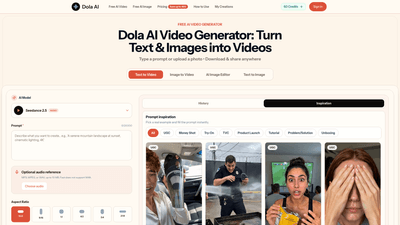
Dola AI Video Generator is a browser-based AI creative studio that instantly turns text prompts and uploaded images into ready-to-post videos and AI-generated images. Built to work in-browser with no downloads or design skills required, it delivers watermark-free outputs in seconds. You can create from text, transform photos into motion clips, edit or generate images, and produce on-brand marketing visuals—all within a single, streamlined tool. Dola AI emphasizes speed, versatility, and a consistent aesthetic, making it ideal for social content, product videos, and concept art without the overhead of traditional video production.
Features
- Text to Video: Describe a scene or idea in plain language and the AI generates a short video clip. You can specify mood, style, and duration to suit social feeds and ads.
- Image to Video: Upload a photo and animate it into a short clip with smooth, natural motion—perfect for product showcases and quick social posts.
- Image to Image and Image Editor: Create high-quality images from prompts (text to image) and refine or re-purpose visuals with built-in editing.
- Styles and Look: Choose from cinematic, photorealistic, anime, illustrative, and more. The AI adapts the look to your brand or mood for consistent results across images and videos.
- Multiple Aspect Ratios and Formats: Prepare content for TikTok, Reels, YouTube Shorts, or ads with formats like 16:9, 9:16, 1:1, 4:3, and other common ratios.
- Video Quality and Length: Generate videos in 480p–720p, with short durations (often 4–15 seconds, depending on your settings) to suit fast-scrolling feeds.
- Watermark-Free Exports: Download clean, high-resolution clips ready to post anywhere—no watermarks.
- In-Browser Workflow: Create, download, and share without installing software. Everything you need—text-to-video, image-to-video, and canvas editing—happens in one tool.
- Prompt Inspiration Library: Access ready-made prompts and templates (e.g., UGC, money shots, product launches, tutorials) to accelerate production and spark ideas.
- History and Canvas Editing: Keep a permanent history of your creations and edit canvases within the same workspace.
- Credits System: Generate images and videos using a credit-based model; credits are shared across image generation, video generation, and canvas editing.
- Commercial Use License ( Enterprise tier): For teams and high-volume creators requiring rights to use outputs commercially.
How to Use
- Start with free daily credits: Dola AI lets you sign in and begin creating with free daily credits, without entering payment details. This lets you test text-to-video and image-to-video workflows before upgrading.
- Step 1 — Prompt or Photo: Type a detailed prompt or upload a photo you want to bring to life. The AI fills in the rest, so you can be as precise or as exploratory as you like.
- Step 2 — Style and Format: Pick a look (realistic, cinematic, anime, photorealistic, etc.) and select the output size for your target platform (TikTok, Reels, Shorts, ads). The system handles resolution and framing automatically.
- Step 3 — Generate and Share: Click Generate. Your clip or image is ready in seconds. Download watermark-free and publish across social channels, websites, or campaigns without extra editing steps.
Use cases span a wide range of needs:
- Turn product photos into scroll-stopping product videos for stores and marketplaces.
- Create social-ready clips for Instagram, TikTok, Reels, and YouTube Shorts.
- Develop character concepts, art, and world-building visuals for games or storytelling.
- Produce on-brand marketing visuals (banners, headers, promo clips) in a single, cohesive style.
Pricing is designed to scale with output, making it easy to start small and grow.
Pricing
- Basic — $19.9 per month
- Up to 40 videos per month
- 800 credits
- Includes AI image generation, AI video generation, unlimited downloads, and permanent history
- Pro — $39.9 per month
- Up to 100 videos per month
- 2,000 credits
- Everything in Basic, plus priority generation queue
- Enterprise — $99.9 per month
- Up to 300 videos per month
- 6,000 credits
- Everything in Pro, plus commercial use license and extended queue priority
Credits are shared across image generation, video generation, and canvas editing, and all exports are watermark-free. Plans can be upgraded or canceled as needed.
Tips
- Start with Free Daily Credits: Use the free daily credits to experiment; you don’t need a credit card to begin.
- Be Specific with Prompts: More precise prompts yield tighter results. Include mood, lighting, and motion cues to guide the AI.
- Explore Styles Early: Test multiple styles (cinematic, photorealistic, anime) to discover what best fits your brand and platform.
- Optimize for Short-form: When targeting Reels or Shorts, keep clips concise (4–15 seconds) and align the aspect ratio to the intended platform.
- Use Audio References: If available, add optional audio references to guide pacing and engagement.
- Maintain Brand Consistency: Use the same style vocabulary (colors, lighting, typography feel) across images and videos to build a recognizable visual identity.
- Leverage Prompts Library: Use the prompt inspiration and templates to jump-start projects—great for UGC, product launches, tutorials, and more.
- Export Watermark-Free: Always download final outputs in high resolution without watermarks for professional use.
- Track Output with History: Use permanent history to revisit or remix past creations without starting from scratch.
- Consider Commercial Use Needs: If you plan to use videos for commercial campaigns, ensure the plan (Enterprise) includes the appropriate license.
Frequently Asked Questions
-
What is Dola AI, and who built it?
- Dola AI is an independent AI video generator that turns text and images into videos in seconds, designed for ease of use in a browser. It is built to provide fast, watermark-free outputs for creators and businesses.
-
Is Dola AI really free?
- Yes, you can sign in and start with free daily credits to create images and short videos without a credit card. Ongoing usage beyond the free credits requires a paid plan.
-
How fast does it generate images and videos?
- Most images and short video clips are ready in about 5–15 seconds, enabling quick experimentation and iteration.
-
Can Dola AI make videos from text, photos, or both?
- Yes. It supports text-to-video, image-to-video, and image-to-image workflows, all within the same browser tool.
-
Are the videos really watermark-free?
- Yes. Exports are clean, high-resolution, and free of watermarks for immediate posting.
-
Can I use the videos for commercial purposes?
- Commercial use is available on higher-tier plans (Enterprise includes a Commercial Use License). Check your plan details to ensure compliance with licensing for campaigns.
-
How long are the videos I can make?
- Videos are designed for short-form content, typically around 4–15 seconds, with the ability to adjust within platform options.
-
What resolution can I download?
- Exports support up to 720p in the standard options, with outputs designed for quick social posting and marketing usage.
-
How do credits work?
- Credits are used for both image and video generation (and canvas editing). They reset with your billing cycle according to your chosen plan.
-
Do I need any design or technical skills?
- No. Dola AI is specifically built to require no design or technical expertise—just prompts or photos to bring your ideas to life.
-
Can I use Dola AI on my phone?
- Access is browser-based and mobile-friendly, so you can create on the go without installing software.
-
Is Dola AI associated with any other brands?
- Dola AI operates as its own platform with its own licensing and terms.
Start creating now and discover how Dola AI Video Generator can streamline your content workflow with a single, powerful tool for text-to-video, image-to-video, and image creation—delivering on-brand visuals quickly and without watermark constraints.