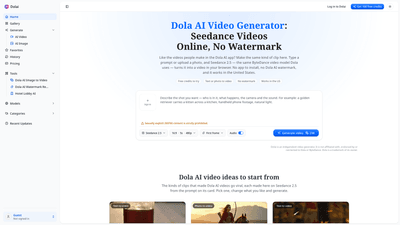
What is it
Dolai is an independent AI video generator that brings the power of Seedance 2.5 directly to your browser. Built around the same ByteDance Seedance video model used by the Dola AI app, Dolai lets you turn a prompt or a photo into a short, cinematic clip without installing an app, downloading any APK, or relying on region-locked services. This browser-based tool is designed for creators who want fast, watermark-free videos that are ready to post or drop into edits. It works in the United States and many other regions, offering a straightforward path to high-quality, caption-friendly video content with no long-term commitments.
What sets Dolai apart is its focus on delivering the video portion of the Dola AI experience in a privacy-friendly, no-install format. You can generate 5–30 second clips in standard social formats, with audio included in the output and no watermark on downloads. New users receive free credits to test the service, and all plans include commercial use rights, so you can create client work, ads, or monetized content without licensing concerns.
Key audiences include product marketers, travel and food creators, portrait and lifestyle editors, and anyone seeking quick, cinematic video assets that feel polished but don’t require a full production crew. The tool emphasizes one clear action per clip, making it ideal for focused product shots, dynamic portraits, or short narrative moments without the complexity of traditional video shoots.
Features
- Text or Photo to Video: Type a prompt or upload a photo to animate the scene. If you upload a photo, it becomes the first frame, and movement is described to bring the image to life.
- No Watermark: Downloads are MP4 files with no watermark, enabling seamless posting and editing in your preferred workflow.
- Browser-Based, No App Required: Run entirely in a modern browser on Windows, Mac, Chromebook, or mobile devices—no downloads, no VPNs, and no APKs.
- Flexible Aspect Ratios: Choose 9:16 for TikTok, Reels, and Shorts, or 16:9 for YouTube before generating to match your distribution channel.
- Short, Sharpened Clips: Each Seedance 2.5 clip runs 5–30 seconds, making it easy to build longer videos by stitching multiple clips.
- Included Soundtrack and Effects: The generated clips come with ambient sound, movement, and effects as part of the output, so you’re not left with silent footage.
- Automatic Credits Display: The system shows the credit cost before generating; if a generation fails, credits are returned automatically.
- History and Easy Download: Generated videos are saved to your history and downloaded as MP4 files for immediate use.
- Commercial Use Rights: All plans explicitly cover commercial use, including client work and ads.
- Independent of Dola/BYTE/Region Locks: Dolai operates separately from Dola AI and is accessible where Dola may be blocked or region-locked, including the US, without VPNs.
Practical use cases include product demonstrations and ads, cinematic food and travel clips, “photos brought to life” reveals of portraits or pets, nostalgic home-movie vibes, dreamy slow-motion sequences, parkour-style action scenes, and even anime or cartoon-inspired visuals—each generated from a single descriptive sentence or a single photo.
How to Use
- Write a prompt or upload a photo
- Describe the scene, action, and camera direction in one or two sentences.
- If you upload a photo, it becomes the first frame; specify the movements you want to see (for example: “the subject turns and smiles, wind lifting hair”).
- Pick the shape and length
- Select 9:16 for mobile-first platforms (TikTok, Reels, Shorts) or 16:9 for traditional widescreen formats.
- Set the desired clip length (remember, Seedance 2.5 supports 5–30 seconds per clip). The credit cost updates as you adjust settings.
- Generate and download
- Click Generate video. The system processes in minutes, saves the result to your history, and exports an MP4 without a watermark.
- If a generation fails, your credits are refunded automatically, so you can try again with a new prompt or photo.
Tip: For longer storytelling, generate multiple 5–30 second clips and assemble them in your preferred editor. Each clip remains watermark-free and commercially licensed, making edits and client work straightforward.
Pricing (overview)
- Free credits to start: New Dolai accounts typically come with an initial 100 free credits to explore the service, plus ongoing free daily allowances for certain plans.
- Per-clip cost example: A typical 5-second Seedance 2.5 clip costs around 238 credits.
- Plans and credits:
- Monthly plan from $39/month for 5,000 credits.
- One-time pack $49 for 4,000 credits (credits do not expire).
- All plans include commercial use rights and no watermark on downloads.
- Free/welcome tier: Dolai offers free access to begin generating, with paid options for heavier usage.
Important note: Dolai is a separate, independent platform from Dola AI and ByteDance. It provides Seedance 2.5-based video generation in the browser with no app install, no region blockage, and no watermark, while Dola AI remains a broader assistant app with chat and photo editing features.
Use Scenarios
- Product and Brand Ads: Create short product shots, reveals, and micro-commercials for social feeds without hiring a production crew.
- Food and Travel Clips: Capture close-ups, sizzling pans, or scenic moments with cinematic lighting and motion.
- Photo-to-Video Portraits: Bring portraits, pets, or old photos to life with subtle movement and atmosphere.
- VR/Cartoon and Anime Style: Generate stylized scenes or retro-inspired visuals from text prompts.
- Social Media Content: Produce vertical 9:16 clips tailored for TikTok, Instagram Reels, and YouTube Shorts to maximize engagement.
Advantages / Unique Value
- Accessibility and Convenience: Full video generation directly in a web browser, no downloads, no installations, and no VPN requirements. Accessible across devices and locations, including the US.
- Watermark-Free Outputs: Every download is a clean MP4 suitable for posting, editing, and client work—no need for post-processing to remove branding.
- Flexible and Fast: Quick prompts, predictable 5–30 second outputs, and a straightforward pricing model. Credits are clear before generation, and failed attempts don’t penalize you.
- Commercially Licensed: All plans permit commercial use, so creators can monetize content, run client campaigns, or publish branded videos without licensing hurdles.
- High-Quality, Studio-Style Clips: Seedance 2.5 provides professional-looking video results with audio and motion that resemble the cinematic style popular across social platforms.
Frequently Asked Questions
-
What is Dola AI, and how does Dolai relate to it? Dolai is an independent browser-based video generator that uses Seedance 2.5 to convert prompts or photos into short videos. It is not affiliated with the Dola AI app or ByteDance, though it shares the same Seedance technology for video generation.
-
Is Dolai free to use? Dolai offers free credits to start and a pay-as-you-go or subscription model for heavier usage. A 5-second Seedance 2.5 clip generally consumes around 238 credits, with higher-usage plans providing more credits and features. All plans include commercial use and watermark-free downloads.
-
Why is Dola AI not available in the US, and how does Dolai help? Dola AI may be region-locked in some areas, including parts of the US. Dolai operates independently in the browser and is accessible without VPNs, offering Seedance 2.5 videos to users in the US and other regions.
-
What AI model does Dolai use? Dolai runs Seedance 2.5 in the browser, the same model used by Dola AI for video generation. This ensures familiar output quality without requiring the Dola app.
-
Can I turn a photo into a video and keep the subject recognizable? Yes. Upload a photo to use as the first frame and describe the motion you want to see, such as “the subject turns and smiles.” The system animates the frame while preserving recognizable features.
-
Can I use generated videos commercially? Yes. All plans grant commercial rights, including for client work, advertisements, and monetized channels.
-
What output formats are available? Generated videos download as MP4 files without any watermark, ready to post or incorporate into edits.
-
How long can a video be, and can I make longer content? Each Seedance 2.5 clip runs 5–30 seconds. For longer videos, create multiple clips and join them in your editor.
-
How do credits work, and what happens if generation fails? Credits are shown before generation. If a generation fails, the credits are automatically returned to your account.
If you’re seeking a fast, accessible, watermark-free way to produce short-form video content from prompts or photos, Dolai offers a powerful, browser-based solution that complements the broader Dola AI ecosystem while providing a unique, independent pathway to Seedance 2.5-powered video creation.