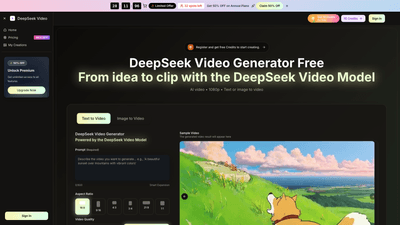
What is it
DeepSeek Video is an AI-powered video generator that turns ideas and images into ready-to-publish clips. Powered by the DeepSeek Video Model, it supports text-to-video and image-to-video workflows, producing cinema-grade motion with natural, physics-aware animation. The platform offers a unified, end-to-end workflow from prompt to publish, including built-in audio alignment, 4K-ready exports, and commercial rights, making it suitable for marketing, education, and creative production. It runs in the cloud with a mobile-friendly interface, so you can create high-quality AI videos on any device.
Features
- Text-to-Video and Image-to-Video: Describe your idea or upload an image, and the AI generates motion, style, and visuals that stay coherent across scenes.
- High-Quality Outputs: Export in 720p, 1080p, or 4K with consistent detail and color.
- Video Formats: MP4 and WebM, optimized for web, social, and broadcast.
- Built-in Audio: Add dialogue, ambience, or music in sync with visuals; lip-sync and audio-picture alignment are integrated.
- 4K-Ready Export: Output sharp, broadcast-ready videos that look great on any platform.
- Commercial Rights Included: Use clips for ads, brand work, client projects, and campaigns without licensing constraints.
- Prompt-to-Visual Accuracy: Complex prompts translate into precise visuals with fewer revisions.
- Unified Toolset: Access the model, editor, and export tools in one place; no separate software needed.
- Multiple Models and Styles: Access Seedream, Sora 2, Seedance, Wan 2.5, and various styles to fit your project.
- Fast Production: From idea to clip in seconds, optimized for speed without sacrificing quality.
- Universal Accessibility: Cloud processing means your device’s hardware limits won’t affect output quality.
- Priority Support and Queue: Faster rendering for higher-tier plans.
- No Watermark: Professional-grade videos suitable for commercial use.
- Royalty-Free Long-Term Access: Permanent video history and reusable assets.
How to Use
- Open the app and set up your creation dashboard. Select the desired style, aspect ratio, and quality to match your channel or platform.
- Add your idea. Write a concise text prompt for text-to-video or upload an image for image-to-video. The AI analyzes movement, mood, and style from your input.
- Generate. Hit generate and your clip appears in seconds. You can preview immediately and ensure motion and visuals stay coherent.
- Refine and export. Adjust timing, color, and audio as needed, then export in HD or 4K for your use case. The process is designed to be quick, with a single workflow from idea to publish.
Pricing is plan-driven, with annual options designed for individuals, teams, and enterprises. New users can start with a free tier and receive credits to begin creating.
Pricing
Note: Promotional offers may change; current options include annual plans with significant savings and a free credits starter.
-
Basic Yearly Plan
- Price (monthly equivalent when billed annually): shown as a lower monthly rate (e.g., $17.9/month in the listed promo context)
- Credits: 1000 credits per month (12,000 credits/year)
- Videos: Up to 100 videos per month
- DeepSeek Video credits: 6,000 credits with annual billing
- Includes: AI video generation, unlimited video downloads, permanent video history, commercial use license, access to multiple models (Seedream, Sora 2, Seedance, Wan 2.5)
- Additional: Priority generation queue, no watermark, priority customer support
- Billing: Yearly only
-
Professional Yearly Plan
- Price (monthly equivalent when billed annually): higher than Basic (e.g., $29.9/month promo)
- Credits: 2,000 credits per month (24,000 credits/year)
- Videos: Up to 200 videos per month
- DeepSeek Video credits: 24,000 credits
- Includes: All Basic features plus professional-focused capabilities
- Billing: Yearly only
-
Enterprise Yearly Plan
- Price (monthly equivalent when billed annually): higher-tier (e.g., $59.9/month promo)
- Credits: 6,000 credits per month (72,000 credits/year)
- Videos: Up to 600 videos per month
- DeepSeek Video credits: 72,000 credits
- Includes: All Professional features plus enterprise-grade capabilities
- Billing: Yearly only
-
Free credits and trials
- New users can register and receive free credits to start creating.
- A free or starter tier typically exists to explore the platform before committing to a paid plan.
-
Promotions
- Flash sale offers often include up to 40% off annual plans. Limited-time offers may appear, with promotions such as “Limited Offer” or “End of sale” banners. Always verify current promotions at checkout.
-
How credits work
- Each video clip consumes credits based on length and quality.
- Credits refresh monthly with subscriptions; one-time packs can be purchased but may not expire as long as the subscription remains active.
- All plans provide the same core tools and capabilities; higher-tier plans simply grant more credits, more videos per month, and priority support.
Tips
- Plan your prompt structure. Start with a concise main idea, then layer details like mood, color palette, and camera movement to guide the AI.
- Choose the right aspect ratio. For social media, 9:16 works well for stories; 16:9 is ideal for YouTube and websites; 4:3 can suit certain educational formats.
- Leverage audio sync. Add ambient sounds or dialogue in the same pass to avoid misalignment later.
- Start with a rough draft. Generate a first cut to check motion coherence, then refine timing and color before final export.
- Use multiple styles for A/B testing. Create variations to see which visuals perform best on target platforms.
- Export in 4K when possible for future-proofed content, especially for campaigns and client work.
- Monitor credits usage. If you’re producing at scale, align video length with your plan’s credit budget to avoid interruptions.
- Keep a consistent brand kit. Use preset styles and colors to maintain brand aesthetics across multiple outputs.
- Test on mobile. Since processing is cloud-based, you can preview and edit on mobile devices for quick edits on the go.
- Utilize commercial rights. Take advantage of included rights to publish ads or client work without additional licensing hurdles.
Frequently Asked Questions
-
What is DeepSeek Video and how does it work? DeepSeek Video turns text or images into clips. Describe or upload, and the AI handles motion and polish, then you export.
-
How is DeepSeek Video different from other AI video generators? It emphasizes physics-aware motion, strong prompt understanding, built-in audio, multi-scene coherence, and 4K exports with commercial rights, all in one workflow.
-
How do I create my first video? Open the app, describe or upload your input, choose style and length, generate, then export.
-
What formats and resolutions are supported? MP4 and WebM exports, with 720p, 1080p, and 4K options. Quality remains consistent across settings.
-
Can I use videos created with DeepSeek Video commercially? Yes. Paid plans include full commercial rights for ads, brands, and client work; output is broadcast-ready.
-
How fast is video generation? Most clips render in seconds to a couple of minutes, depending on length and resolution.
-
Is DeepSeek Video available on mobile? Yes. The app runs in mobile browsers with cloud processing, so device limitations do not impact output quality.
-
What types of videos can I create? Ads, social posts, education, product clips, storytelling, music visuals, and more, with a range of styles from photorealistic to stylized.
-
How does the credit system work? Each clip consumes credits based on length and quality. New users receive free credits. Subscriptions replenish credits monthly; one-time packs do not expire with the subscription.
-
Is it suitable for professionals and enterprises? Yes. DeepSeek Video scales from individual creators to enterprise teams, offering more credits, higher video caps, and priority support.
-
What support is available? Priority generation queues and priority customer support are included in higher-tier plans; you can also contact support for assistance.
Ready to elevate your AI video production? DeepSeek Video provides a fast, scalable, and rights-friendly solution for turning prompts and images into ready-to-publish video content.