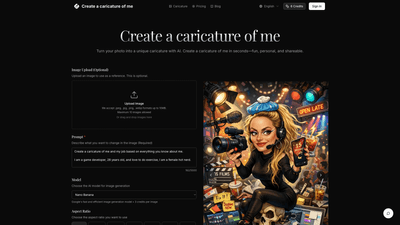
What is it
Create a caricature of me is a web-based AI tool that turns your photos into personalized cartoons in seconds. By leveraging advanced image generation models, it preserves recognizable facial likeness while adding creative flair—whether you want a cartoon, sketch, anime, or a custom style. The process is simple: upload a photo (optional), describe the caricature you want, choose an AI model and output format, then generate and download. It’s ideal for profile pictures, gifts, social media posts, and professional avatars, all without requiring any design skills.
Key value:
- Fast, fun, and shareable caricatures that keep your likeness.
- Multiple AI models and styles to customize the look.
- No design background needed—anyone can create a high-quality caricature in minutes.
Features
-
AI-driven caricature generation
- Turn photos into artistic caricatures while preserving recognizable features.
- Style options include cartoon, sketch, anime, or custom prompts.
-
Model variety and quality
- Access a range of AI models (e.g., Nano Banana, Nano Banana Pro, GPT-4o Image, ImageFlux Kontext, Google’s fast image model) to achieve different aesthetics, richness, and fidelity.
-
Flexible output controls
- Aspect ratios: choose from a wide set (e.g., 1:1, 16:9, 4:3, 3:2, 2:3, 5:4, 21:9, auto).
- Output formats: PNG or JPG for easy sharing and use across platforms.
- Generate multiple variants in a single session to compare styles and prompts.
-
Image input and management
- Optional image upload supports JPEG, JPG, PNG, and WEBP up to 10 MB per image.
- Up to several images per session (maximum limits shown on the platform).
-
User-friendly workflow
- Four-step process: upload, describe style, select model/format, generate and download.
- Results are ready in seconds, with easy download and sharing options.
-
Credit-based pricing and accessibility
- Uses a credits system to access generation. Different models may use different credit rates (e.g., standard models commonly priced per image).
- Sign-in to manage credits and sessions.
-
Privacy and independence
- The service is described as an independent tool powered by multiple AI models; outputs reflect third-party model capabilities.
How to Use
- Upload your photo (optional)
- You can upload a clear, well-lit face or full-body photo.
- Supported formats: .jpeg, .jpg, .png, .webp; up to 10 MB per image.
- You can upload up to 10 images in a single session.
- Describe your caricature style
- Provide a prompt describing the look you want: cartoon, sketch, anime, or a custom vibe.
- The more specific your description, the closer the result to your vision.
- Pick model and format
- Choose from multiple AI models for different looks and qualities.
- Select aspect ratio and output format (PNG or JPG).
- Generate and download
- Click generate to produce your caricature in seconds.
- Download and use it as a shareable avatar, gift, or post.
Pricing
- The service uses a credit-based pricing model. A typical setup shows 6 credits to access the service, with 3 credits per image for higher-quality or certain model options.
- You can purchase additional credits as needed; credits are deducted per generated caricature based on the model and prompts used.
- Sign-in is required to manage credits and access ongoing usage. The site may present pricing and credit options on the dedicated pricing page or during checkout.
- There may be no long-term subscription by default, with a pay-as-you-go credit system instead.
Tips
- Start with a high-quality, front-facing photo.
- Use clear prompts to steer style: “cartoon-style, bold lines, bright colors,” or “sketch-style with subtle shading.”
- Experiment with different AI models to compare details, linework, and overall vibe.
- Try multiple aspect ratios to see what works best for your intended use (profile image, poster, or flyer).
- Export in high resolution (PNG preferred for quality) to ensure crisp social media avatars or prints.
- Use the generated caricature across platforms: LinkedIn, Instagram, Twitter, or as a personalized gift.
- Keep a few variants on hand; you can rotate avatars or use different styles for different channels.
Frequently Asked Questions
-
How Create a caricature of me works and how to get the best caricature from your photo
- Upload a photo, describe your desired caricature style, pick a model and format, then generate and download. For best results, provide a precise style prompt and use a well-lit, frontal or near-frontal portrait.
-
How does Image to Image differ from Text to Image generation?
- Image to Image uses your uploaded photo as the starting point and applies transformations to resemble a caricature, while Text to Image starts from a blank canvas guided by your textual prompt. Both leverage AI models but approach the result from different inputs.
-
What types of images work best with the transformation?
- Clear, well-lit front-facing or slight-angle photos with a distinct facial feature set tend to produce the most recognizable caricatures.
-
How much control do I have over the transformation process?
- You can control style via prompts, choose from multiple AI models, adjust aspect ratio, and select output formats. The combination of prompt specificity and model selection gives substantial control over the final result.
-
How long does the transformation process take?
- Most caricatures are generated in seconds, allowing you to try multiple prompts and models quickly.
-
What image formats and sizes are supported?
- Supported formats include JPEG, JPG, PNG, and WEBP, up to 10 MB per image. Up to 10 images can be uploaded per session.
-
Can I use transformed images for commercial purposes?
- Usage rights depend on the platform’s terms. Typically, outputs created with AI tools can be used commercially, but you should review the service’s terms of service and licensing for specific rights and restrictions.
-
Is there a limit to how many images I can transform?
- There may be session limits (e.g., up to 10 images per session), and long-term usage is governed by your credits balance. Check the pricing/credits section for current limits.
-
Is Create a caricature of me affiliated with the AI providers?
- Create a caricature of me is described as an independent service that uses outputs from multiple AI models. It is not affiliated with, endorsed by, or sponsored by the model providers.
-
How can I get help or support?
- For assistance, contact support at [email protected].
Optimized for discovery and usability, Create a caricature of me offers a practical, fast, and enjoyable way to turn ordinary photos into distinctive caricatures. Whether you’re building a professional avatar, crafting a memorable gift, or fueling social media content, this tool provides a flexible, credit-based approach to explore many creative styles with minimal effort.