What is it
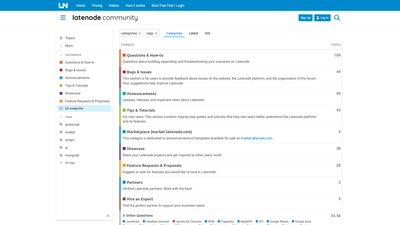
Latenode is an AI-powered platform designed to simplify building, expanding, and troubleshooting automation workflows through scenario-based development. It combines a robust builder with a rich marketplace of templates, enabling developers, teams, and businesses to create AI-driven agents and automation without starting from scratch. The platform emphasizes collaborative learning through Tips & Tutorials, a dedicated Showcase for sharing projects, and a Marketplace (market.latenode.com) where users can discover and purchase ready-made templates. With support for a wide range of integrations and tools (including Google Sheets, Gmail, Notion, Airtable, Zapier, and more), Latenode positions itself as an end-to-end solution for crafting scalable AI-driven workflows.
Key keywords: Latenode, AI platform, AI agents, scenario-based automation, template marketplace, automation workflows, LangChain, OpenAI, integrations, headless browser, Puppeteer, APIs.
Features
- AI Agent and Scenario Builder: Create intelligent agents capable of performing complex tasks by orchestrating multiple steps, data sources, and commands within a single workflow.
- Template Marketplace: Browse market.latenode.com for ready-to-use templates and templates shared by the community to accelerate development.
- Wide Range of Integrations: Connect with popular services and tools such as Google Sheets, Google Docs, Gmail, Google Drive, Notion, Airtable, Zapier, Discord, Telegram, Jira, Calendly, Calendars, Giphy, Shopify, and more to automate end-to-end processes.
- Tutorials and Tips: Access a growing library of Tips & Tutorials to help new users learn the platform quickly and effectively, reducing ramp time.
- Showcasing and Collaboration: Share your Latenode projects in the Showcase to inspire others and get feedback, fostering a collaborative ecosystem.
- Community and Support: Engage with questions, how-tos, bug reports, and feature requests to improve the platform and your automations.
- Open to API and Code-Based Enhancements: Leverage resources for advanced users (e.g., NPMP, Puppeteer, RapidAPI, and API integrations) to extend capabilities.
These features combine to provide a comprehensive environment for designing AI-driven automation, validating ideas quickly, and scaling successful workflows across teams and use cases.
How to Use
- Sign up and start with a Free Trial
- Begin your journey by signing up or logging in to access the Latenode workspace. A Free Trial allows you to explore core features and test AI-driven scenarios before committing to a paid plan.
- Explore or Create Scenarios
- Use the Scenario Builder to design AI-driven workflows or browse templates from the Marketplace to jump-start development. Market templates offer ready-made patterns you can customize to fit your needs.
- Connect Integrations
- Link your workflows to a broad set of services (Google Sheets, Gmail, Google Drive, Notion, Airtable, Zapier, Discord, Jira, etc.) to automate data flows, notifications, and actions across apps.
- Execute, Test, and Iterate
- Run your scenarios using real data, test edge cases, and refine the logic. Leverage Tips & Tutorials to optimize performance and reliability.
- Collaborate and Share
- Publish successful projects to the Showcase, request features, or join discussions in the community to gather feedback and improve your automations.
- Pricing and Access
- Details about pricing are available on the Pricing page. The platform offers a Free Trial, with paid tiers providing additional capabilities, templates, support, and higher usage limits.
Core use cases include building AI assistants that can read, summarize, and act on data across Google Sheets or Notion, automating customer support workflows via Gmail and Slack, and orchestrating multi-step tasks that involve external APIs and headless browser actions (Puppeteer) for web automation.
Pricing
Latenode provides a Free Trial to help new users evaluate the platform. For detailed pricing information, including what’s included in free vs. paid tiers and any usage limits, please refer to the official Pricing page. The general model includes a free entry point and paid plans that unlock more templates, advanced features, higher throughput, and priority support.
Tips for pricing consideration:
- Start with the Free Trial to validate fit for your team’s use cases.
- Review Marketplace templates to gauge potential ROI and time-to-value.
- Consider required integrations and data volumes to select the appropriate paid tier.
Tips
- Leverage the Template Marketplace to accelerate development. Start with a proven template and adapt it to your specific workflow.
- Use Tutorials and Tips for quick onboarding, especially if you’re new to AI agents, LangChain, or API integrations.
- Engage with the Showcase to learn from real-world projects and get inspiration for your own automations.
- Plan your automation in modular steps: input gathering, decision logic, action execution, and results reporting to improve maintainability.
- Prioritize security and data governance by auditing where data flows and ensuring sensitive information is handled appropriately.
- Explore integrations with popular tools (Google Sheets, Notion, Airtable, Gmail, Jira, Zapier, etc.) to maximize the value of AI-driven workflows.
Frequently Asked Questions
- What is Latenode?
- Latenode is an AI-powered platform for building, deploying, and managing automation workflows and AI agents using scenario-based development and a marketplace of templates.
- How do I start?
- Sign up and start with a Free Trial. You can browse templates, build new scenarios, and connect integrations to begin automating tasks.
- What can I build with Latenode?
- You can create AI-driven agents and multi-step automations that interact with data sources and services such as Google Sheets, Gmail, Notion, Airtable, and more.
- What integrations are supported?
- The platform supports a broad range of integrations, including Google Sheets, Google Docs, Gmail, Google Drive, Notion, Airtable, Zapier, Discord, Jira, Calendly, and others.
- Is there a free tier?
- Yes, there is a Free Trial. Pricing details for ongoing plans are available on the Pricing page.
- How do I get help or provide feedback?
- Use the platform’s Tips & Tutorials, join questions & how-to discussions, report bugs, and submit feature requests through the community channels.
- Can I publish templates or share my work?
- Yes, you can share your projects in the Showcase and contribute templates to help others accelerate their development.
This introduction emphasizes Latenode’s value proposition as a comprehensive AI automation platform, highlighting its scenario-based approach, marketplace, broad integrations, and community-driven ecosystem. It targets professionals seeking scalable AI solutions for building and managing automated workflows with ready-made templates and collaborative tooling.