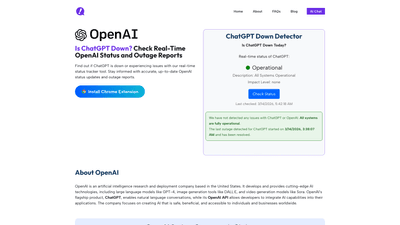
What is it
ChatGPT Down Detector is a real-time status tracker designed to help users quickly determine the health of ChatGPT and OpenAI services. It provides up-to-the-minute updates on outages, performance issues, and service status across multiple OpenAI components, including ChatGPT, the OpenAI API, DALL·E, Sora, and related tools. The platform emphasizes accuracy, reliability, and speed, delivering status information in a clear, actionable format so teams can decide on next steps without guesswork.
Key benefits include real-time status checks, instant outage notifications, and access to historical downtime data. The service also offers a lightweight Chrome extension for one-click status checks and auto-refresh updates. Note: ChatGPT Down Detector operates independently and is not officially affiliated with OpenAI; it aggregates data from OpenAI’s official API sources and user-reported reports to provide a comprehensive view of service health.
Features
- Real-Time Status Updates: Monitor the health of ChatGPT and OpenAI services as issues arise, with status indicators showing operational levels.
- Multi-Service Monitoring: Track not only ChatGPT but also the OpenAI API (for developers), DALL•E, Sora (image and video tools), and other related components.
- Instant Notifications: Quickly identify outages or degraded performance to minimize disruption.
- User-Reported Outages: Leverage crowdsourced reports to gain broader insight into regional or widespread problems.
- Historical Downtime Data: Access records of past outages to understand reliability patterns and plan work around known risk windows.
- Free & Accessible: No signup or login required for basic status checks.
- Chrome Extension: Lightweight extension enabling one-click status checks directly from your browser, with auto-refresh and privacy-first design.
- Official API Data Sourcing: Status information is pulled from OpenAI’s official signals when available, providing a trusted reference point (with a clear disclaimer about affiliation).
Practical use cases:
- Developers verifying API availability before integrating OpenAI services into an app.
- Content teams and researchers needing reliable status before long-form workflows or data processing.
- Customer support and IT teams triaging incidents and communicating with stakeholders.
- Freelancers and professionals who rely on ChatGPT for productivity and want to avoid downtime surprises.
How to Use
-
Web Access
- Visit the status page to see the current health of ChatGPT and OpenAI services.
- Read the “Operational” status indicators and any recent incident notes.
- Use the historical data view to understand uptime trends and recurring issues.
- If you encounter a problem that isn’t clearly reflected, you can rely on user-reported outage data to gauge broader impact and corroborate your experience.
-
Chrome Extension
- Install the ChatGPT Down Detector extension from the Chrome Web Store.
- Click the extension icon to view a real-time status snapshot with a single click.
- The extension provides auto-refreshing updates and a privacy-first, no-data-collection approach.
- Use the extension for on-the-spot checks during peak work sessions or while troubleshooting.
-
How This Helps Your Workflow
- Before starting a high-stakes task (coding, content generation, data analysis), verify service health to set realistic timelines.
- When an issue is detected, switch to offline tasks or alternative tools, and communicate the status to your team using current, sourced information.
- If a problem persists, use the “Report an Outage” option (where available) to contribute to the broader community’s visibility and speed up identification of widespread issues.
Pricing
- Free Access: The primary status checks are available without sign-up or payment.
- Chrome Extension: Free to install and use, with no required subscription.
- No Paid Tiers Listed: The platform’s public-facing model emphasizes free, accessible status tracking; there are no explicit paid tiers mentioned in the available information.
- Important note: This tool is not affiliated with OpenAI. While it sources data from official signals when possible, it remains an independent monitoring resource.
Tips
- Bookmark the status page for quick reference during daily operations.
- Rely on real-time status rather than anecdotes when planning critical tasks.
- Cross-check with OpenAI’s official status pages during suspected outages for corroboration.
- Use the Chrome extension for immediate checks while you’re working in-browser, especially when you’re testing integrations or producing content with AI tools.
- Review historical downtime data to identify patterns and plan maintenance windows or alternative workflows accordingly.
- If you experience issues, consider reporting them to help other users gauge the scope and impact of outages.
Frequently Asked Questions
-
Is ChatGPT Down Detector affiliated with OpenAI?
- No. This platform is an independent status tracker and is not officially endorsed by or affiliated with OpenAI. It aggregates data from official sources when available and user reports to provide a comprehensive view of service health.
-
Is this service free to use?
- Yes. The core status checks are free, and the Chrome extension is also offered at no cost. There is no signup required for basic use.
-
How do I know the status information is reliable?
- The tool emphasizes real-time updates and cross-referencing with OpenAI’s signals when available. It also incorporates user-reported outages to reflect on-the-ground experiences. For critical decisions, corroborate with the official OpenAI status page as well.
-
What should I do if ChatGPT is down?
- Check the current status on the site or extension, confirm via multiple sources if possible, and communicate the issue to your team. If downtime affects essential work, switch to offline tasks or alternative tools and monitor for updates until services restore.
-
Can I report issues I’m experiencing?
- Yes. The platform typically allows user-submitted outage reports to help build a broader picture of service health. This can assist others in your region and workflow.
-
Does the tool track only ChatGPT, or can it monitor the OpenAI API and other services?
- It tracks multiple OpenAI components, including ChatGPT, OpenAI API, DALL·E, Sora, and related services, providing a multi-service view of uptime and performance.
-
How often is the status updated?
- Status updates are provided in real time or near real time, with auto-refresh options available in the Chrome extension to keep information current.
-
Is there a paid version with more features?
- Based on the available information, there are no publicly listed paid tiers. The emphasis is on free, real-time status tracking with optional extension-based convenience.
This product summary highlights the core value proposition: a fast, reliable, and accessible way to stay informed about the uptime and health of ChatGPT and OpenAI services, enabling better planning, faster troubleshooting, and reduced downtime-related friction for professionals who depend on AI tools.