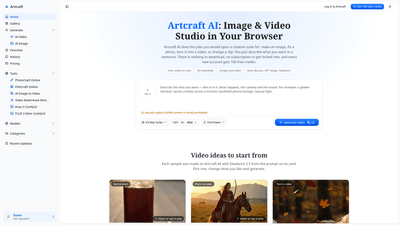
What is it
Artcraft AI is a browser-based Image and Video Studio that lets you create, edit, and animate visuals entirely in the web browser. No downloads, no heavy software to install, and no long-term commitments. New users start with 100 free credits, making it easy to explore text-to-image, image editing, text-to-video, and image-to-video capabilities without upfront costs. Artcraft AI brings together a suite of models for both images and video, enabling quick, professional results from a simple description or an upload. It positions itself as an accessible Adobe-like alternative for fast, credit-based generation—with outputs that are watermark-free and usable for commercial purposes.
Key strengths include a wide range of AI models (for images and video), a variety of in-browser tools (PhotoCraft Online, FilmCraft Online, OpenAI-style image generation, image-to-video and video watermark removal), and a user experience designed around prompts and one-click generation rather than layered tools and timelines. Outputs can be produced in up to 4K and are stored in your history for easy re-use or refinements.
Features
- Browser-based, no installation required: Run Artcraft AI from any modern browser on laptop, tablet, or phone.
- Image and video studio in one: Text-to-image, AI photo editing, text-to-video, image-to-video, and video editing workflows in a single space.
- PhotoCraft Online: Edit photos by describing the change (remove backgrounds, remove people, swap skies, adjust lighting) without layers or masks. Up to four photos can be uploaded per session.
- FilmCraft Online: Create videos from prompts or photos, with sound, or generate a full video from a single brief. You can also upload a short clip and alter it with a sentence.
- AI image generators: Models include Nano Banana 2, Nano Banana Pro, GPT Image 2, Krea 2 Turbo, and FLUX 3 Klein, with up to 4K output and prompts that drive production.
- OpenImage to Video: Upload a still; describe the motion; the image becomes the first frame and maintains faces, outfits, and products as the scene comes alive.
- OpenAI-style image description: Describe a scene and generate back in high resolution (up to 4K) for product shots, posters, thumbnails, and characters.
- Video watermark remover: Remove watermarks, logos, or captions from a clip while it moves, delivering clean final video.
- Seedance and H3 models for video: Seedance 2.5, Seedance 2 Mini for varied styles; H3 Max and H3 Max Turbo produce 5–15 second clips with embedded sound, while Artcraft 1.0 can write, cut, and score longer videos from a single brief.
- No watermark on outputs: All downloads are watermark-free, across all plans, including the free start.
- Commercial use included: Every plan grants commercial rights, including client work, ads, and monetized content.
- Credit-based pricing with transparent costs: The cost is shown before you generate; credits are refunded automatically if a generation fails.
- Free start and affordable paid plans: 100 free credits on new accounts; plans begin at $39/month for 5,000 credits; a one-time pack of 4,000 credits is available for $49 and never expires.
- History and model-switching: Your results are saved to history, and you can switch models within the same tool to compare outputs before committing.
- Accessibility across devices: Designed to work on Windows, Mac, Linux, Chromebook, Android, and iPhone, enabling on-the-go creative experimentation.
How to Use
- Sign in or create an Artcraft AI account to receive 100 free credits. There is no obligation to provide a credit card or commit to a subscription initially.
- Choose a tool that matches your goal:
- PhotoCraft Online for image edits and photo improvements.
- FilmCraft Online for video creation from a prompt or a photo (with sound).
- AI Image Generator or OpenImage to Video for image-to-video workflows.
- Video Watermark Remover to clean up existing footage.
- Pick a model. Each model has a defined cost shown in the prompt box before you generate. You can mix and match models in the same session to compare results.
- Describe your result in a sentence or upload your photo/clip. For PhotoCraft Online, you can upload up to four photos to edit. For video tasks, you can upload clips or start from text prompts.
- Generate and download. Images typically render within a minute; video renders take a few minutes, depending on length and complexity. Outputs are saved to your history and come without watermarks. If a generation fails, the system credits you back automatically.
- Review and refine. Use the history to re-run with slightly different prompts or switch models to compare results within the same session. For longer projects, create multiple short clips (5–15 seconds) and assemble them as needed.
- Pricing awareness. The free 100 credits apply to initial exploration. The cost of each generation is shown before you press generate. If you anticipate frequent use, you can opt for a monthly plan or a one-time credit pack. All plans include commercial use rights.
Tips for best results:
- Describe one main action per clip when generating video.
- Start from a still or short clip for smoother transitions when using image-to-video features.
- For photo edits, keep prompts concise and specific about the change (background, lighting, sky, etc.).
- Ensure you have rights to all assets you upload; NSFW content is prohibited.
- Take advantage of multiple models to compare styles and outputs in the same box.
Pricing
- Free to start: 100 free credits for new accounts; no card required and no subscription.
- Credit costs: Each image or video generation costs credits, with the specific amount displayed in the tool before you generate. For example, a 5-second H3 Max Turbo clip costs 63 credits.
- Plans (monthly): From $39 per month for 5,000 credits. Plans are cancelable at any time.
- One-time packs: $49 for 4,000 credits that never expire. Suitable if you prefer a non-subscription option.
- Commercial use included: All plans grant commercial rights, including client work and monetized content.
- Credits refund policy: If a generation fails, the spent credits are refunded automatically.
Tips
- Use the “history” feature to revisit previous results and tweak prompts for better outcomes.
- Experiment with different models for the same prompt to compare aesthetics, turnarounds, and sound design (especially with Seedance/H3 Turbo outputs).
- Keep content rights in mind: only upload assets you own or have permission to edit and publish.
- Output fidelity: For faces or product shots, verify that the result preserves key features and branding as needed.
Frequently Asked Questions
- What is Artcraft AI? An online studio for AI-generated images and videos, offering text-to-image, AI photo editing, text-to-video, image-to-video, clip editing, and video watermark removal. It runs entirely in a browser and supports multiple AI models.
- Is Artcraft AI free? Yes, you can start for free with 100 credits. Additional generations use credits, with pricing shown before generation.
- Is this the official ArtCraft app? No. Artcraft AI is an independent web studio and is not affiliated with Adobe or the original ArtCraft desktop apps. The open-source desktop variants (e.g., PhotoCraft, FilmCraft) are separate projects.
- Do I need to download anything? No. Everything runs in a modern browser on any device.
- Which models are available? Image models include Nano Banana 2, Nano Banana Pro, GPT Image 2, Krea 2 Turbo, FLUX.3 Klein; Video models include Seedance 2.5, Seedance 2 Mini, H3 Max, H3 Max Turbo.
- Are outputs watermark-free? Yes, all downloads are watermark-free, even on the free tier.
- Can I use outputs commercially? Yes. Commercial use is included on every plan, including the free credits, for client work, ads, and monetizable content.
- Are PSDs or layered files supported? No. Photo edits work on common image formats (JPG, PNG, WebP, HEIC) and do not support layered PSD workflows.
- Can I edit long videos? For long, layered editing or PSD-based workflows, desktop editors are often preferable. Artcraft AI focuses on quick, prompt-based, short-form output and rapid previews.
- What devices work with Artcraft AI? It runs in any modern browser on Windows, Mac, Linux, Chromebook, Android, and iPhone.
- How do credits work? Each generation deducts credits. If a generation fails, credits are automatically returned. You can see the cost before you generate.
This cohesive suite—Artcraft AI—offers a practical, scalable, and affordable path to creating high-quality AI-generated images and short videos directly in your browser. By combining multiple models and tasks (image editing, image-to-video, and video generation) into a single workflow, it delivers a fast, flexible, and credit-transparent alternative to traditional desktop editors, with commercial-use freedom and no mandatory subscription.