What is it
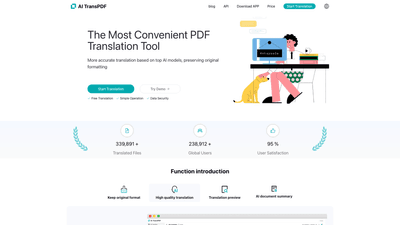
AI TransPDF is the most convenient AI-powered document translation tool designed to translate PDFs and other document formats while preserving the original layout. Built on top-tier AI models and modern translation workflows, it delivers high-quality translations across 80+ languages, keeping images, formulas, and tables intact. The platform supports multiple formats (PDF, PPT, DOC, TXT, and more) and offers translation previews, AI-driven document summaries, and post-processing options to fine-tune formatting. With a strong global footprint—over 339,891 translated files and 238,912+ global users—and a 95% user satisfaction rate, AI TransPDF aims to streamline professional translation workflows without sacrificing formatting accuracy. It’s widely used for academic papers, business documents, product manuals, and more.
Features
- High-quality translations driven by top AI models and the latest translation workflows
- Preserve original formatting: perfect retention of the layout, fonts, and structure
- Translation preview to review results before finalizing
- AI document summary to grasp key points quickly
- Maintain layout while handling complex content: images, formulas, and tables stay aligned
- Supports 80+ languages and multiple document formats (PDF, PPTX, DOCX, TXT, Excel, and more)
- Post-editing tools to refine output; repair seals or formulas as needed
- Ultra-flexible formatting: adjust format details to your preferences
- Easy workflow: Upload file → Select parameters → Get results → Post-editing
- Strong data privacy practices: encrypted storage and user-controlled deletion
How to Use
- Upload: Drag and drop or select a document (PDF, PPTX, DOCX, TXT, Excel, etc.).
- Select Parameters: Choose target language(s), preserve formatting options, and any post-editing preferences.
- Get Results: View the translated output with a preview, including images, tables, and formulas.
- Post-Edit: If needed, use post-editing tools to fix formatting, tables, or special characters; repair seals or formulas as required.
- Save/Export: Download the translated document in your preferred format or continue editing.
- Pricing and Access: The platform offers daily free trial quotas for users who want to try the service at no cost, with paid tiers for ongoing use.
Pricing details (see Pricing section) reflect the substantial computational costs of large language models. Translation speed varies with document size and content complexity, typically ranging from 1–2 minutes to over 10 minutes for larger documents.
Pricing
- Not free by default, but daily free trial quotas are available for users who want to test the service.
- Pricing reflects the computational costs of large language models and the translation workflow.
- Prices may be adjusted periodically as algorithmic and model efficiencies evolve.
- There are paid tiers to accommodate ongoing translation needs, with access to features like higher priority processing, larger files, and more frequent translation history tracking.
Tips
- Prepare term glossaries for consistency across large projects (e.g., technical terms, product names).
- Use the translation preview to verify that key tables, figures, and formulas align correctly before finalizing.
- For complex documents (theses, research papers, manuals), enable post-editing to refine nuance and tone.
- Take advantage of the AI document summary to quickly capture the essence of long documents.
- Regularly delete sensitive documents from the platform after translation if confidentiality is a concern; encrypted storage is used to protect data, and you can delete your files at any time with guaranteed cleanup within 24 hours after deletion.
- Check formatting after translation, especially for slides (PPTX) and multi-column layouts, to ensure no layout drift.
Frequently Asked Questions
-
How long does it take to translate a document? Large language models are slower than traditional machine translation. Depending on the amount of text, translation can take anywhere from one to two minutes to over ten minutes for larger files.
-
How good are the translation results? Your document is translated by top-tier large language models and current translation workflows. In tests, it represents a high level of AI translation. However, we do not guarantee translation quality and do not recommend using these translated documents in professional contexts.
-
Is translation free? It’s not free by default, but daily free trial quotas are available for users who want to try the service. A significant portion of costs comes from the computational expenses of large language models. Prices may be adjusted as models evolve.
-
Will my document be stored after translation? To facilitate translation history, documents are stored on our servers in encrypted form. We promise not to leak documents. You can delete your document at any time, and we will clean up all related files within 24 hours after deletion.
-
What types of translations are supported? Document Translation, including PDF Translation, PPTX Translation, DocX Translation, Excel Translation, and other formats. The platform also supports translation across multiple languages and document types to fit various workflows.
-
Who can benefit from AI TransPDF? Researchers, students, professionals, cross-border teams, and businesses that need fast, accurate translations without losing original formatting. It’s particularly valuable for theses, research papers, manuals, product documentation, and corporate correspondences.
-
Is there a free trial or demo? Yes, daily free trial quotas are available to explore features like formatting retention, translation quality, and document previews before subscribing to a paid plan.
-
How secure is my data? Translations occur with encrypted storage and strict data handling practices. You can delete documents at any time, and all related data is removed within 24 hours after deletion.
-
Can I edit translations after downloading? Yes. You can review the translation in the preview and use post-editing tools before finalizing and exporting the file.
-
Are there any limits on file size or language support? The tool supports large documents and 80+ languages, with formats including PDF, PPTX, DOCX, TXT, and more. Specific limits may apply to different pricing tiers.
This AI TransPDF product overview highlights its ability to deliver accurate, presentation-ready translations while preserving the original structure and formatting. It serves as a comprehensive resource for researchers, students, and professionals seeking efficient, reliable AI-assisted document translation across dozens of languages. If you’re looking to translate complex documents like theses, business reports, or product manuals without sacrificing layout integrity, AI TransPDF offers a powerful solution with scalable pricing and trial options.