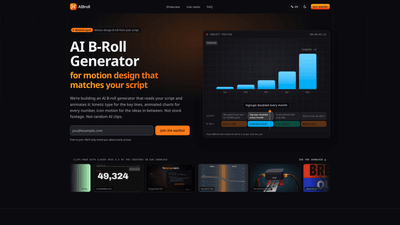
What is it
AIBroll is an AI-powered B-roll generator designed for motion design that reads your script and animates it into on-screen visuals. Instead of stock footage or generic AI clips, AIBroll creates motion graphics that directly reflect the words and numbers in your script. Expect kinetic typography for key lines, animated charts for data, and icon motion for ideas between points. The tool is still in development, with an early access waitlist open to join before public launch. The showcased clips demonstrate what the system aims to achieve: script-driven motion design B-roll that matches every word and number, ready to drop into your editing workflow.
Who should consider AIBroll? Content creators, video editors, marketers, and brands seeking data-driven, branded visuals for explainers, ads, tutorials, and SaaS/product videos. It’s especially valuable for faceless channels and voiceover-heavy content where camera footage isn’t feasible or desired.
Features
- Script-driven motion design B-roll: Each sentence in your script becomes a timeline slot with visuals generated to match its meaning.
- Kinetic type for key lines: Dynamic typography that emphasizes important phrases exactly where they’re spoken.
- Animated charts and data visuals: Numbers and metrics are transformed into animated charts that illustrate trends and values in real time.
- Icon motion for ideas: Visual icons animate to reflect concepts and transitions between ideas.
- Non-stock, script-specific visuals: The animation is built from your script’s content, not from stock clips or generic AI cuts.
- Output formats for editors: Export to standard aspect ratios (16:9, 9:16, 1:1) as MP4 clips, ready to drop into major editors like Premiere Pro, Final Cut Pro, DaVinci Resolve, CapCut, and more.
- Three-step workflow (from script to B-roll): Paste your script, render line-by-line visuals, and export to your editor.
- Brand-friendly potential: Visuals are designed to align with your script and branding, aiming for a cohesive look rather than a generic stock feel.
- Showcases from independent creators: Clips in the public showcase demonstrate the style and capabilities (made with Claude Opus 5.5) and credit the original creators.
Pricing and licensing details are forthcoming. Joining the waitlist is free, and you’ll receive updates about early access before public availability.
How to Use
- Paste your script
- Copy your voiceover script, video outline, or transcript and paste it into AIBroll. Each sentence becomes a discrete slot on the timeline, making it easy to align visuals with speech or text.
- Let visuals match your lines
- For every line, the system generates visuals that reflect the content: key phrases trigger kinetic type, numbers trigger animated charts, and ideas trigger icon motion. This ensures visuals move in sync with the exact wording rather than relying on generic keyword matching.
- Export to your editor
- Once your B-roll is generated, export the clips in 16:9, 9:16, or 1:1 aspect ratios as MP4 files. These are ready to import into popular editors like Adobe Premiere Pro, Final Cut Pro, DaVinci Resolve, CapCut, and others.
- Use cases and delivery
- Use the resulting B-roll to illustrate explanations, product demos, data-driven messages, or educational content. The goal is to complement voiceover with precise, on-message visuals that reinforce what’s being said.
Pricing: The waitlist is free to join. Pricing for the product itself has not been finalized yet; it will be published before launch. Early access is prioritized for waitlist members, with communications about availability via email.
Tips
- Structure your script for best results: Write sentences that clearly convey a single idea or data point. Short, crisp lines map cleanly to individual B-roll slots.
- Emphasize numbers and metrics: When your script contains statistics, consider how you want them represented—plan where animated charts will appear to maximize impact.
- Include specific nouns and actions: Clear nouns (e.g., “revenues,” “Q3 growth,” or “conversion rate”) help the generator craft relevant icons and charts.
- Align branding: If you have brand colors and fonts, prepare them in advance so visuals can be designed to stay consistent with your branding.
- Prepare multiple formats: Export in 16:9 for YouTube and widescreen uses, 9:16 for Stories/Reels, and 1:1 for social feeds to maximize distribution.
- Plan for edits: If you anticipate updates to your script, maintain a modular structure so you can replace or adjust individual lines without reworking entire scenes.
- Test with a transcript: If you already have a video recording, its transcript can serve as your script to generate corresponding B-roll, enabling quick retrofitting.
Pricing
- Waitlist access: Free to join. You’ll receive emails about early access opportunities.
- Public pricing: Not yet announced. The team plans to publish pricing before launch, with early access opportunities for waitlist members.
- Licensing: The exact terms for commercial use will be provided in the official licensing/terms at launch. The current intent is to support commercial videos, including monetized channels and client work, with the precise license details forthcoming.
Frequently Asked Questions
-
What is AI B-roll? B-roll is supporting footage that plays over or between your main shot or voiceover—cutaways, charts, on-screen text, product shots. AI B-roll is B-roll produced by AI rather than filmed footage or stock clips. AIBroll focuses specifically on motion design B-roll generated from your script, not generic AI video tied to keywords.
-
What is motion design B-roll? Animated graphics used as B-roll: kinetic typography, animated charts and counters, icon animations, logo reveals, and UI motion. It’s designed to place ideas and data on screen precisely when they’re spoken, making complex information easier to follow.
-
How is AIBroll different from other AI B-roll generators? Many B-roll tools search stock footage or generate clips that loosely match a keyword. AIBroll reads each line of your script and animates what it actually says, so phrases like “revenue grew 40%” appear as a chart moving to 40% rather than showing a generic office scene.
-
When does AIBroll launch? The project is in development and does not have a public date yet. Early access is offered to waitlist members, with notifications sent when access opens.
-
Is AIBroll free? Joining the waitlist is free. Pricing for the product is not decided yet; details will be published before launch.
-
Can I use the B-roll in commercial videos? The goal is to allow commercial use, including monetized YouTube content and client work. The exact license will be defined in the terms at launch. Showcase clips credited to the creators who made them are not produced by AIBroll itself.
-
Do I need my own footage or a camera? No. AIBroll works from a script and is designed to support faceless channels, voiceover-only videos, and talking-head formats needing cutaways.
-
Can it add B-roll to a video I’ve already recorded? In the initial version, the tool works from a script. If you have a finished recording, its transcript can serve as the script for generating B-roll. Directly placing new clips onto an existing timeline is planned for later updates.
-
Which video editors will it work with? The plan is to export standard MP4 clips in 16:9, 9:16, and 1:1, compatible with Premiere Pro, Final Cut Pro, DaVinci Resolve, CapCut, and other editors.
-
Who created the clips in the showcase? Clips in the public showcase were created by independent creators using Claude Opus 5.5. Each clip is credited to its creator with links to the original post. They illustrate the motion design B-roll style that AIBroll aims to generate from scripts.
-
How does the waitlist work? By joining the waitlist, you’ll be among the first to turn a script into motion design B-roll that directly matches every word and number. You’ll receive early access notifications via email when adoption opens.
-
What kinds of projects is AIBroll best suited for? AIBroll excels in explainer videos, educational content, product demos, SaaS and marketing videos, ads and VSLs, and any scenario where words and numbers benefit from precise on-screen visuals. It’s particularly beneficial for creating consistent, branded visuals without relying on on-location shooting or stock footage.
This comprehensive overview highlights AIBroll’s unique value: a script-driven, data-aware motion design B-roll tool that translates exact words and numbers into engaging visuals, reducing dependence on stock footage while enabling branded, scalable videos across formats. If you’re seeking to elevate explainers, educational content, and product storytelling with precise on-screen data and concepts, AIBroll aims to be a compelling solution once it enters early access.